
 English
 Svenska
Categories
Creating a GDPR-compliant privacy policy
What a GDPR privacy policy needs and how to link it from your forms and footer.
On this page
The GDPR puts a simple principle at its core: people have the right to control their personal data. As a company that handles personal data, you are responsible for disclosing what you do with it. This is where a privacy policy becomes essential.
Not legal advice
This article is for information only and is not a replacement for legal advice. We strongly recommend speaking with a legal expert before you publish your privacy policy. A legal advisor helps make sure your privacy policy aligns with the law.
What is personal data?
Under the GDPR, personal data includes any information that can identify a person. The range is wide, including but not limited to:
- Email addresses.
- First and last names.
- Locations (city, town, and country).
- Shipping or billing addresses.
- Social security numbers.
Even seemingly anonymous data can fall under this umbrella if it can be linked to other data to identify a person.
Personal data is not limited to the basics; it extends to the digital world. From IP addresses to cookie data, a wide range of information can be classified as personal data. Your website may even handle personal data from people who have never directly contacted your company. That is why your privacy policy must leave no room for doubt about the types of personal data you process and why you need it.
Why do I need a GDPR-compliant privacy policy?
Your company might already have a privacy policy that follows national laws such as:
- California Online Privacy Protection Act (CalOPPA).
- Canada’s Personal Information Protection and Electronic Documents Act (PIPEDA).
- Australia’s Privacy Act.
- The United Kingdom’s Data Protection Act 1998 (DPA).
- The EU’s Data Protection Directive.
- Singapore’s Personal Data Protection Act 2012 (PDPA).
The GDPR is in a league of its own and sets requirements that go beyond these laws. Even if your existing privacy policy follows them, it might not meet the stricter GDPR standards.
Is a privacy policy mandatory?
Under the GDPR, the privacy policy (also called a privacy statement or privacy notice) is a cornerstone of your company’s compliance. It is not only required under the GDPR but also mandated by many other national laws. The benefits of a GDPR-compliant privacy policy are many:
- You show your commitment to safeguarding your customers’ personal data.
- Your customers gain clarity about how much personal data your company manages.
- You confirm the legality of your data protection practices.
Remember that the privacy policy should cover anyone whose personal data you might process, including visitors to your website.
Tips for creating a privacy policy
Here are some pointers to get you started:
- Begin your privacy policy with a brief introduction to your company and the purpose of the policy.
- Clearly state the effective date of the privacy policy.
- Include your company’s legal name and business address.
- Provide contact details for your Data Protection Officer (DPO).
Write in plain language
GDPR requires you to write your privacy policy in a clear, human voice and to avoid legal jargon. A sample privacy policy (opens in a new tab) can point you in the right direction. This article is for information only, so seek legal advice before you publish your privacy policy.
How to display your privacy policy on your site
The most important places to encourage visitors to review your privacy policy are any form where you collect names and email addresses, and your footer.
Add a link to your privacy policy in a form
-
Create the privacy policy page in the Website Builder. The process is similar to creating a Cookie Policy page.
-
Add the Forms block to the desired spot on your canvas, click the form itself, and tick the Display GDPR consent field checkbox in its Form settings, then the Advanced tab.
-
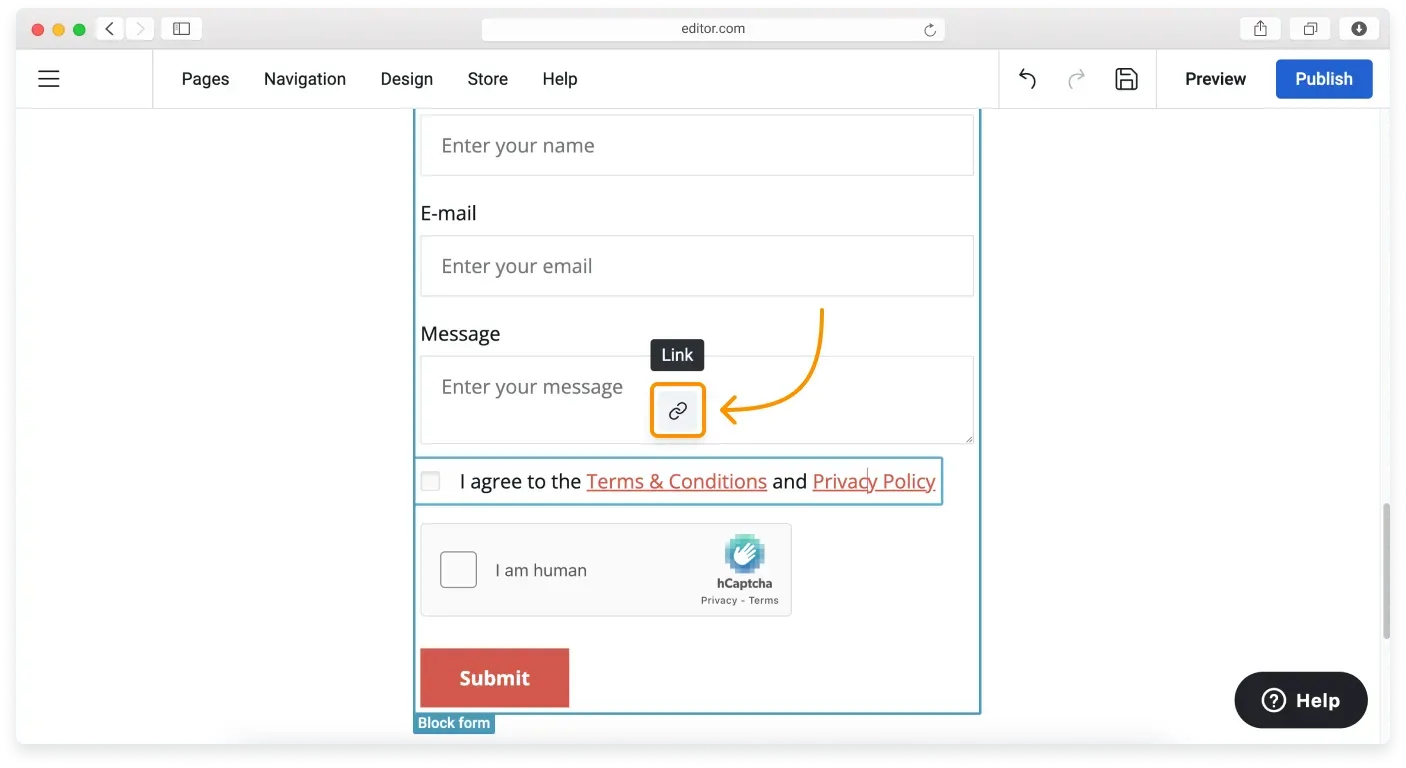
Click the privacy policy link in the consent field and click its Link icon.
-
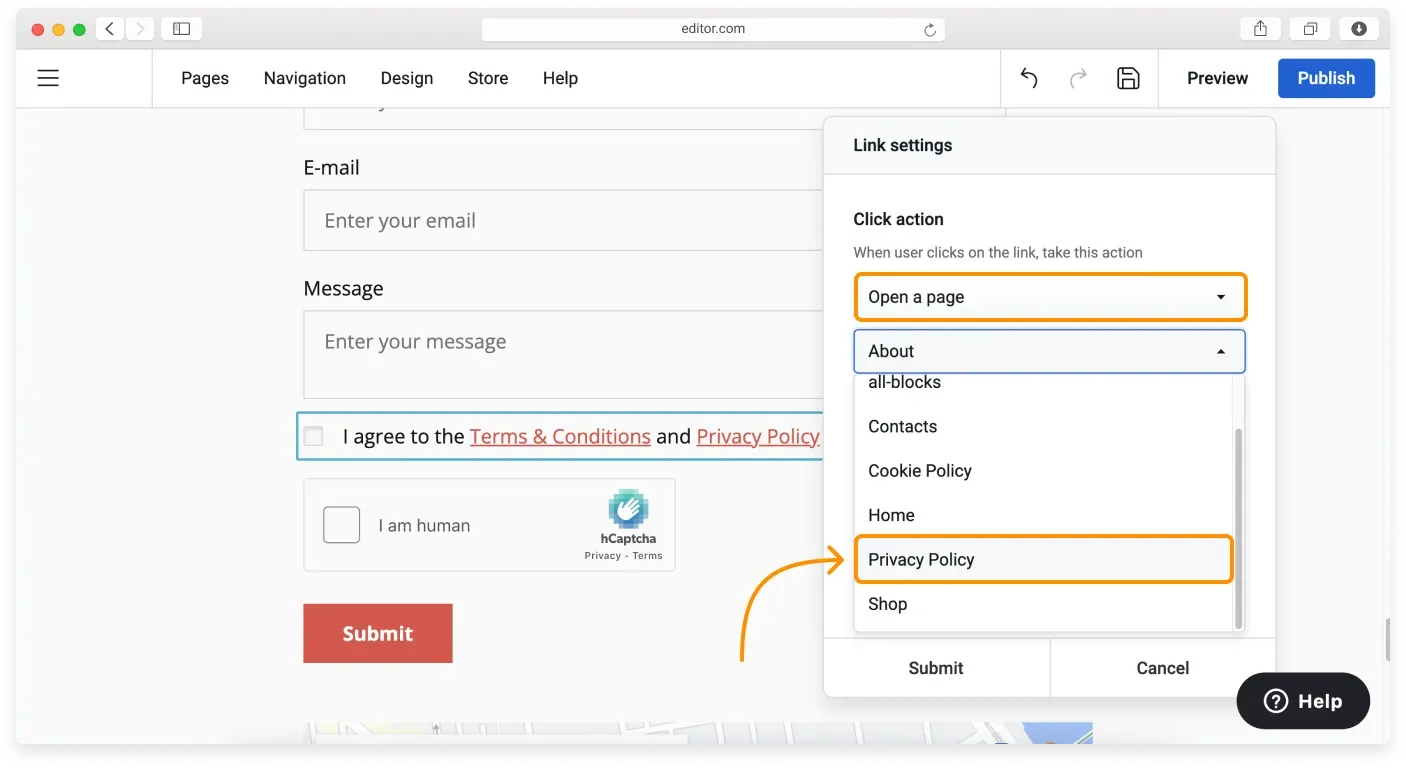
Set Open a page as the click action in the Link settings and choose your privacy policy page from the dropdown list below.
-
Click Submit and publish your site to make the changes live.
You have now added your GDPR-compliant privacy policy to your forms.
Show your privacy policy in the footer
- Go to your footer block and click the footer navigation to open the List settings. (If navigation is not enabled in the footer, open Block settings and tick the Footer navigation option.)
- Click the blue Plus (+) button to add a new item.
- Choose Open a page for the click action and choose your privacy policy page from the dropdown list below.
- Type the navigation item name into the Title field and click Submit in this window and the next to add your privacy policy link to the footer navigation.
You can also merge your privacy policy with your Terms and Conditions agreement on your site. See the example in our article, Creating GDPR-compliant Terms and Conditions (with a sample).
Related articles
- Your website and GDPRWhat GDPR means for your website and the common steps that help you comply.
- Essential and non-essential cookiesUnderstand what cookies do and the difference between essential and non-essential cookies.
- Adding a cookie consent bannerTurn on and customize a cookie consent banner so EU visitors can accept cookies.
Can’t find what you need?
Contact our team. We’re here 24/7 by email and ticket.