
 English
 Svenska
Categories
Creating a GDPR-compliant cookie policy
What a cookie policy must cover and how to build and link one on your site.
On this page
In this article, you will learn what a cookie policy is, the requirements under the General Data Protection Regulation (GDPR), and how to create and display a GDPR-compliant cookie policy page on your website.
What is a cookie policy?
A cookie policy is a document that explains to your website users which cookies your website uses, what user data those cookies track, the purposes they serve, and where the data is managed.
Under the GDPR, your cookie policy should also explain how visitors can opt out of cookies or adjust their cookie settings on your website. To keep full control over your cookies and to maintain an accurate, up-to-date cookie policy, it is essential to create a GDPR-compliant cookie policy that is connected to the key data collection areas of your website.
Who needs a cookie policy?
The GDPR is a universal law across the European Union, which means it affects all websites, wherever they are located, if they receive visitors from the EU. So all websites should explain their use of cookies to users.
Do I need a separate cookie policy if I already have a privacy policy?
The GDPR gives website visitors the right to access specific, up-to-date information about the data recorded about them, why it is collected, where it is managed, and how they can prevent it.
This requirement calls for a dedicated cookie policy on your website that contains specific, accurate, and up-to-date information on your website’s use of cookies and users’ options for accepting or rejecting them. These rules apply to your cookie policy, cookie notification, cookie consent, and the documentation of those consents.
The difference between a cookie policy and a privacy policy
It is important to tell your cookie policy and your privacy policy apart. The privacy policy is a comprehensive document covering all data processing on your website, while the cookie policy specifically addresses the use of cookies. This is necessary because cookies can change quickly, given their ability to track, store, and share user behavior, often involving third-party services with their own policies. Your cookie policy must cover these aspects.
When you update your privacy policy, you must notify your users. Frequent updates may bother your users. When you update your cookie policy, however, there is no obligation to send a notification.
What your cookie policy should cover
Your cookie policy should give detailed information on:
- Types of cookies in use.
- How long cookies stay on users’ browsers.
- Data collected by cookies.
- Purposes for collecting this data (for example, functionality, performance, statistics, or marketing).
- Data recipients and sharing practices.
- How to reject cookies and change cookie settings.
You can find many examples (opens in a new tab) and templates (opens in a new tab) for your cookie policy on the internet.
Keep it current
Your cookie policy must be reviewed and updated regularly so it always provides accurate information about the cookies in use on your site.
How to create a cookie policy page
To create a new page for your cookie policy:
-
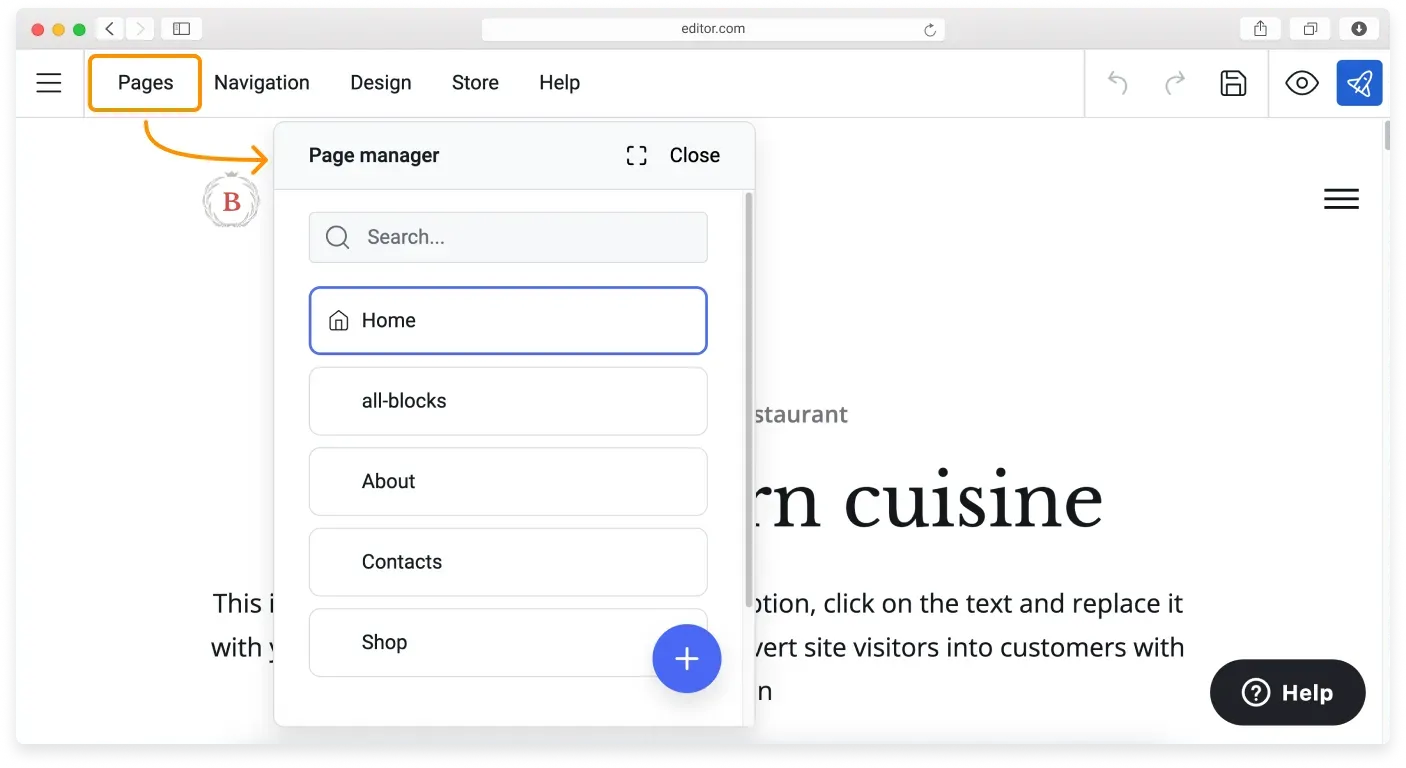
Click Pages on the Topbar to open the Page manager menu.
-
Click the blue Plus (+) button to add a new page.
-
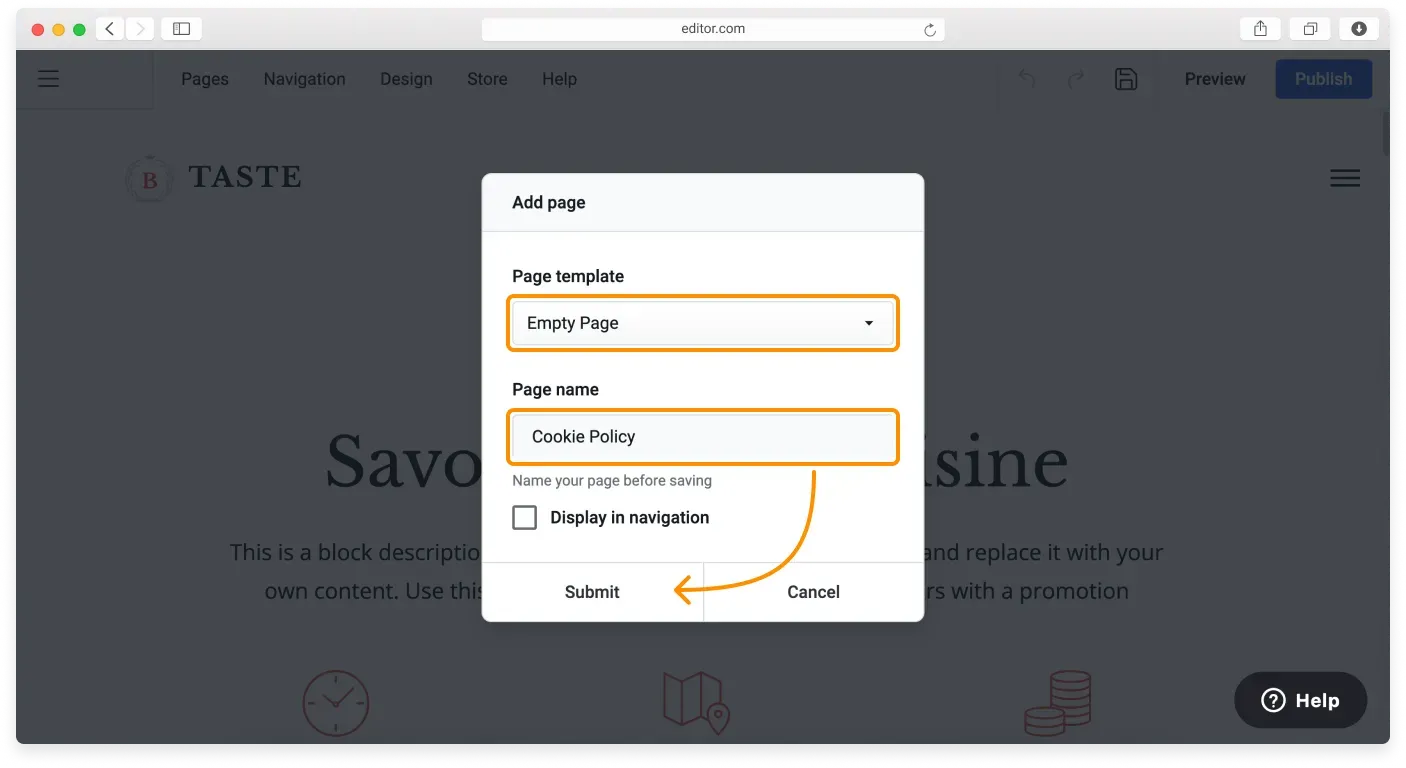
Choose the Empty page template in the Add page menu and enter a name for the page: Cookie Policy. The Display in navigation option can stay unticked unless you want it to appear in your header navigation. Click Submit to save your new page.
-
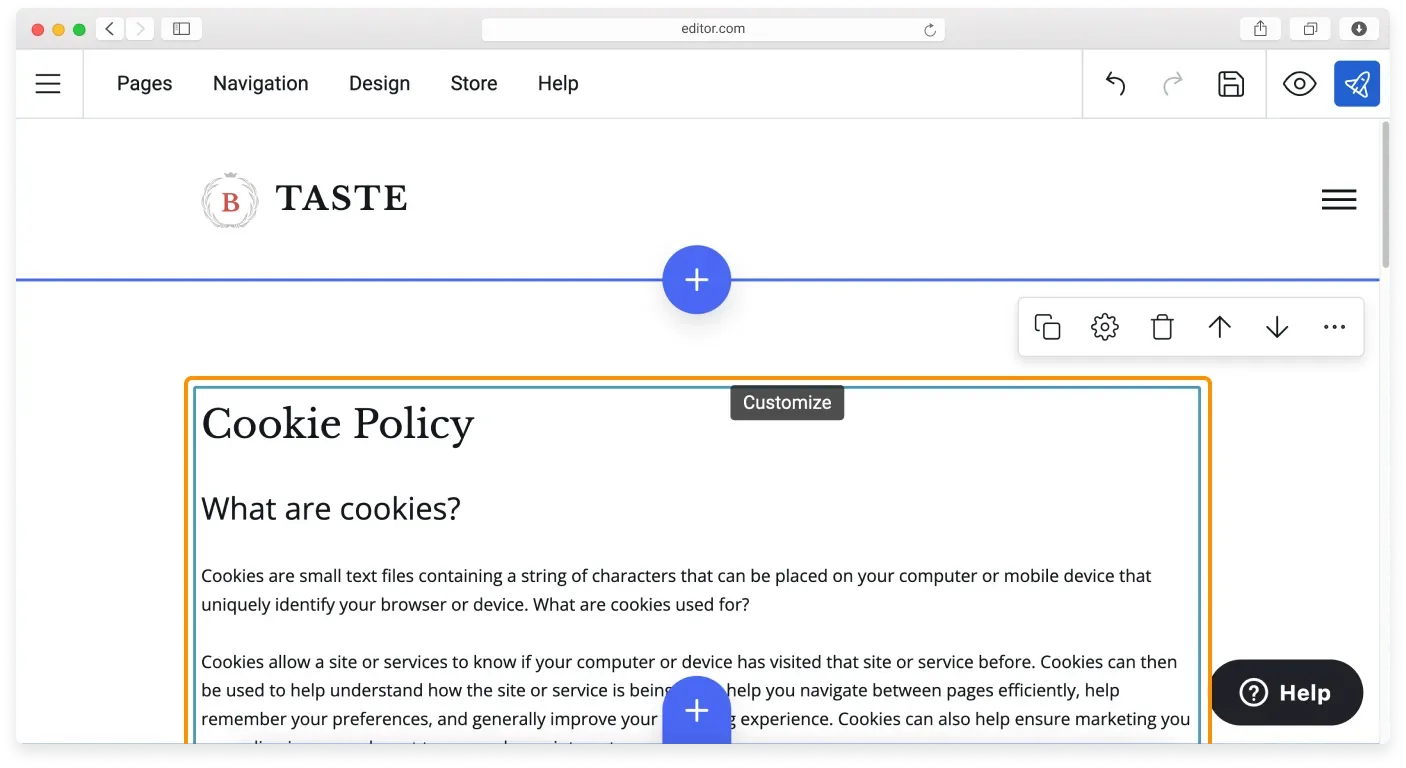
Click the blue Plus (+) button to add a block to your new page. Choose the Text block from the Blocks library, then select a layout (with or without an image).
-
Type or paste the text of your cookie policy into the block and format it. Once done, click Publish to save the changes on your website.
Displaying your cookie policy page on your website
You have several options for displaying your cookie policy:
- Include it within your privacy policy.
- Place it in the website footer.
- Present it in the cookie consent banner.
Adding a cookie policy to the footer
Here is how to display your cookie policy in the footer.
-
Go to your footer block and click the footer navigation to open the List settings. (If navigation is not enabled in the footer, open Block settings and tick the Footer navigation option.)
-
Click the blue Plus (+) button to add a new item.
-
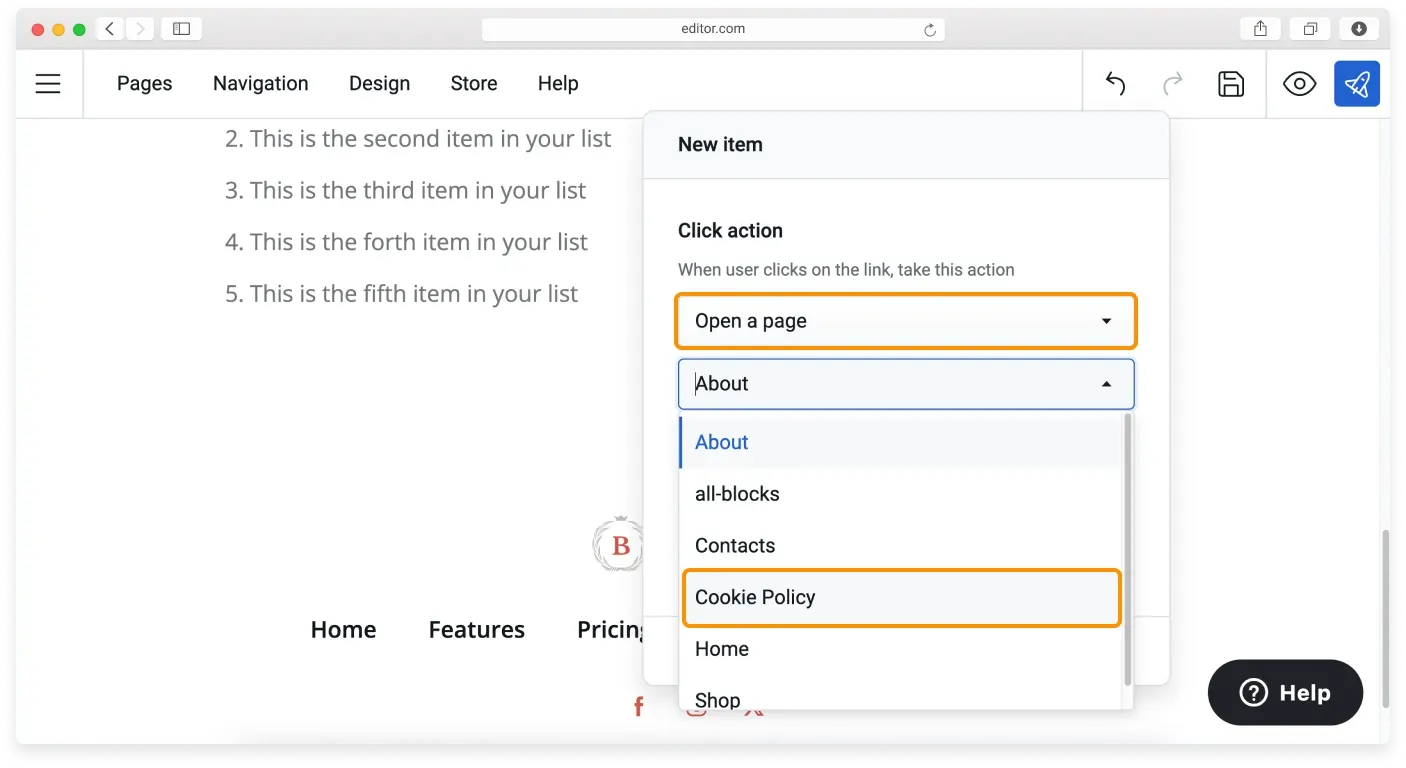
Choose Open a page for the click action and choose your cookie policy page from the dropdown list below.
-
Type the navigation item name into the Title field and click Submit in this window and the next to add your cookie policy link to the footer navigation.
You can also encourage your visitors to read the cookie policy page in the cookie consent banner or the CookieBot banner.
Best practices for creating a cookie policy
- Identify all cookies in use on your website to create a specific, accurate policy.
- Write your policy in plain language to comply with GDPR requirements.
- Keep your cookie policy up to date, providing specific, accurate, and continually updated information.
- Consider third-party cookies, as they may have their own policies.
- Educate users about their rights regarding data collection and how to exercise those rights.
Get legal advice
GDPR compliance is a complex matter, and consulting legal experts may be necessary to ensure full compliance with the regulation.
Related articles
- Your website and GDPRWhat GDPR means for your website and the common steps that help you comply.
- Essential and non-essential cookiesUnderstand what cookies do and the difference between essential and non-essential cookies.
- Adding a cookie consent bannerTurn on and customize a cookie consent banner so EU visitors can accept cookies.
Can’t find what you need?
Contact our team. We’re here 24/7 by email and ticket.