
 English
 Svenska
Kategorier
Den här artikeln finns inte på svenska än. Här är den engelska versionen.
Reordering navigation menu items
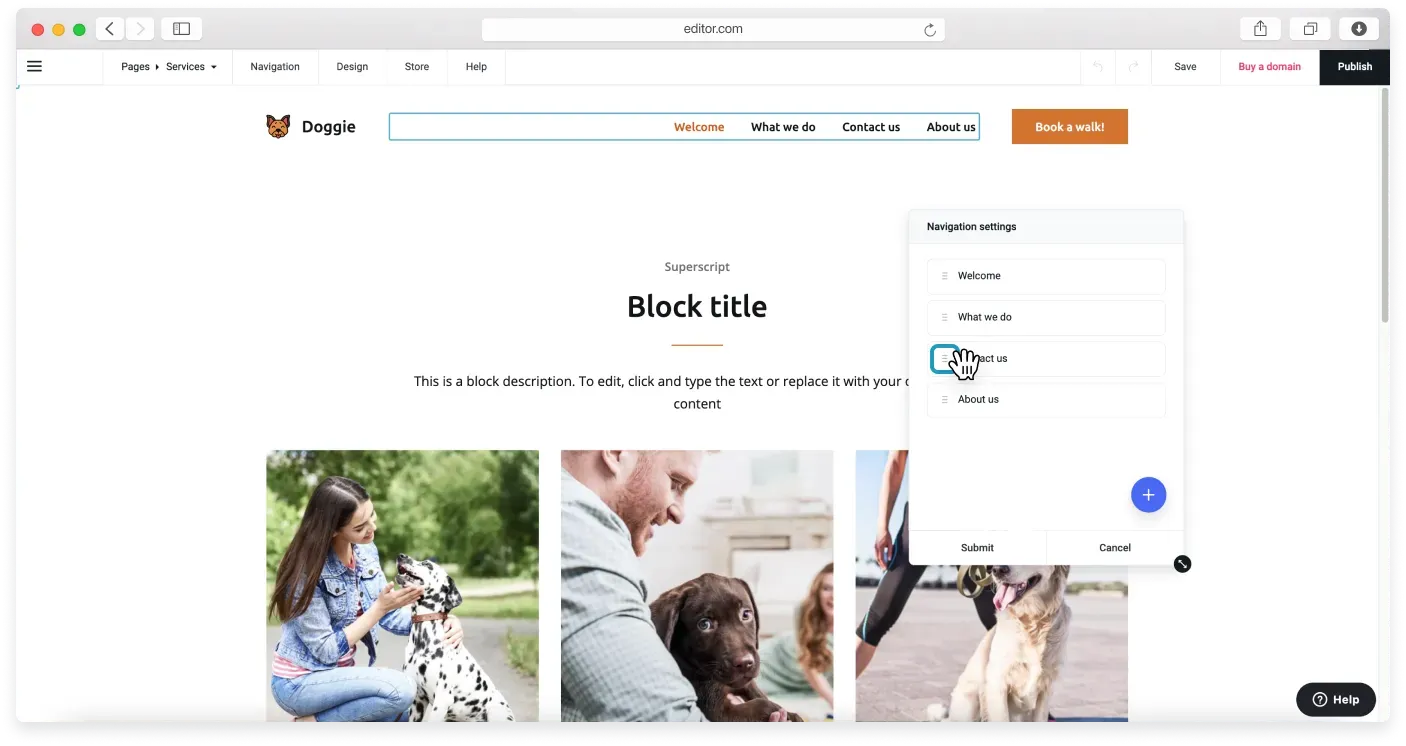
Drag and drop items to change the order they appear in your site's navigation menu.
You can organize the items in your navigation menu however you like. To change their order in your website’s navigation, follow these steps:
- Hover over the header block on any page of your website.
- Click the Navigation Settings icon.
- In the next menu, you will see a sortable list of your page links. Hover over the page name whose position you want to change.
- Click and hold the icon that looks like a stack of lines, then drag and drop it to the position you want.
- Click Submit to confirm the changes. The navigation items will now appear in the new order.
Relaterade artiklar
- Custom blockBuild a block from scratch by arranging widgets like text, images, buttons, and forms exactly how you want.
- Block settingsAdjust a block's layout and appearance, from background and spacing to alignment, borders, and overlays.
- Premium blocksAccess advanced, trend-focused block layouts available on paid Website Builder plans.
Hittar du inte det du söker?
Kontakta vårt team. Vi finns här dygnet runt via e‑post och supportärende.